







In 5 Top Linux Computer Vendors for Small Business and 3 Open-Source Point-of-Sale Systems for Small Business, I discussed the Linux operating system as a reliable, secure alternative to computers running Microsoft Windows, and we profiled some of the best Linux vendors and support options.
In this article, I take a look at some of the excellent Linux video-creation and video-editing software, from easy to Hollywood extravaganza. Before we go any further I must share my Number One Pro Video Tip: Shoot your videos from a tripod. Please, for the love of humanity and for the comfort of your viewers.
Now that I’ve got that off my chest, let’s get on with your open source video software options.
Open Source Video Editors for Small Business
1. OpenShot
The OpenShot video editor is a superior choice for the beginning videographer. It is easy to learn, and fully-featured with a well-chosen feature set that may make it the only video editor you’ll ever need.
OpenShot lets you combine still images, audio tracks, and movie clips. It supports all the usual effects such as pans and fades, subtitles and captions, and scrolling titles and credits. It comes with a truckload of special effects such as black-and-white, sepia, glow, distortions, color effects, and old film appearance, and you can animate a group of still images.
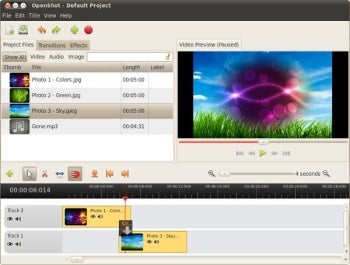
Figure 1: If you’re new to making videos, the easy-to-learn OpenShot is a great choice.
OpenShot exports to a wide variety of formats and quality levels, including HD and Blu-Ray, and it can export directly to your YouTube or Vimeo account. You can also slow down or speed up clips.
Consult the documentation to learn all about it, though it’s so well-designed I doubt you’ll be reaching for the manual all that often. It runs only on Linux, and the nice OpenShot developers offer a free live DVD image. It includes a complete Linux operating system and OpenShot, so you can easily try it without installing it.
Download the image, burn it to a blank DVD, boot it up and give it a whirl.
Price, support, platform: Free of cost, community support, Linux.
2. Kdenlive
The next step up is Kdenlive, a professional-level video editor with nearly the ease-of-use of OpenShot, but with many more capabilities. It supports tethered shooting from any Firewire-connected video camera, which is a great way to keep your old DV or HDV camera (DV and HDV record to tape) in service.
Of course, you can also use lower-end camcorders that rely on compact Flash storage; simply connect the camera to a computer via USB to copy the files over, and then edit. You can also record your computer desktop and make screencasts, which is a great way to make training videos for new software, and you can capture from any video media connected to your computer, such as a DVD or video player.
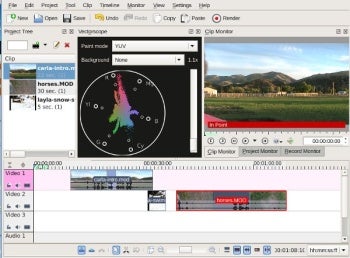
Figure 2: Kdenlive offers loads of features without being overly complicated.
Kdenlive includes a clip monitor, record monitor, and project monitor, which let you preview everything you’re doing in real time. Just like OpenShot, you can mix pretty much any video or audio media, and Kdenlive provides tools for organizing your projects and syncing audio and video tracks.
You can export video files to whatever format and quality level you want, such as TV, DVD, mobile devices, Web, Blu-Ray and high-definition. The second-to-last step any video editor takes is to render your project into its final form, which takes a few minutes, and Kdenlive allows you to continue working while it’s rendering.
Kdenlive has a raft of other useful features such as notes, creative effects, scripting support, and creating custom profiles. The Kdenlive community have created a big batch of shared profiles, and you can preview and download these with a couple of clicks. You can also download project profiles and cool title templates.
Price, support, platform: Free of cost, community support, Linux and Mac.