







OwnCloud is the amazing new open source cloud upstart that makes it easy to set up your own private cloud server. This lets you and your employees share files and calendars — and access the data files from anywhere — while you maintain control over the server upon which the data resides. This is the cloud implementation to watch because of its ease and user-friendliness.
OwnCloud includes a lot of other services such as shared contacts, integration with external cloud storage vendors such as Amazon, Dropbox and Google, and integration with internal storage servers and devices. OwnCloud is still young (2 years old), and some of these features are not quite mature yet, but development is progressing at a fast pace. Its most developed features are file sharing and synchronization, and calendaring. These are essential tools for most small businesses, so we’ll look at how to use OwnCloud for these services.
Cloud? What is this Cloud?
“Cloud” is a deliberately vague marketing term, so let’s take a moment to get specific. It’s just client-server computing, like we’ve been using for decades. We use Web servers, file servers, and mail servers every day. We complain to our help desks that “the server is too slow.” A cloud is a collection of advanced server technologies that provide a lot of flexibility in managing and allocating server resources. Amazon’s cloud services, for one example, take advantage of this by letting customers purchase storage and services on demand: they are able to scale up and down almost instantly. So customers do not need to purchase fixed amounts of services, but pay only for what they actually use.
OwnCloud doesn’t match Amazon’s level of sophistication, of course, but it does enable a useful assortment of services and flexibility without requiring a computer science degree to use it.
Getting OwnCloud
OwnCloud comes in Community, Business, Enterprise, and Service Provider editions. The Community version is free of cost. The other editions cost money and come with support and advanced features. You can download the Community edition for free and install it on your own server.
The Documentation Centre includes installation instructions for Windows server and Linux servers. OwnCloud is Web-based, which makes it easy on your users because all they need to access your OwnCloud server is a plain-old ordinary Web browser. But Web servers are moderately complex to set up, so the hardest part of using OwnCloud is installing it. Installation is a simple task for any moderately experienced server administrator, so if you need to hire help it won’t cost more than a couple hours of their time.
After installation, OwnCloud is a breeze to administer, so let’s take a quick tour. Figure 1 shows the main administration panel.
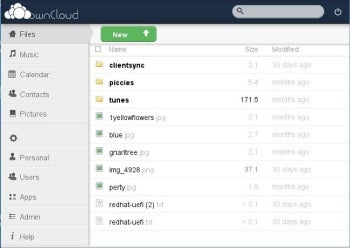
Figure 1: The OwnCloud Web administration panel.
The OwnCloud Web administration page features an elegantly simple lay out. There are no complicated menu trees, because nothing goes beyond the top level; when you click any tab, all the information you need is right in front of you — no clicking-and-hunting to find things.