







Once upon a time, a 40-megabyte hard drive was the size of a cinder block and cost nearly $1,000. That’s “megabyte” with an “m.” Of course, we’ve become accustomed to multi-gigabyte storage capacity for years. But it wasn’t so long ago that the thought of a terabyte – over 1,000 gigabytes – conveyed a sense of epic grandeur, the kind of storage capacity you’d only expect to find in enterprise data centers or at the IRS.
Sometimes the breakneck speed of technological change still manages to deliver a surprise. Take, for example, the Mercury Elite-AL Pro, a two terabyte external hard drive currently sitting on our desk. In a box a fraction of the size as a cinder block and not much larger than a CD-ROM. Perhaps the only trait it shares in common with the 40MB drive of twenty years ago is the $1,000 price tag.
Small Brick, Huge Capacity
Out of the box, the $999.97 Mercury Elite-AL Pro is a sleek, narrow aluminum box just over nine inches deep, five inches high and three-inches wide. At three pounds, it’s not exactly the kind of micro-storage you would toss into your laptop bag, but it tucks easily into any workspace.
At the back of the drive, you’ll find several cable connections — one Firewire (400 Mbps), two Firewire (800 Mbps), one USB 2.0, a power plug and a power toggle switch. The front grill covers a blue LED that shines when power is on and blinks on disk access. It would be nice if there were a switch to disable the coolly distracting blue glow, but failing that, it’s easy enough to stow or orient the unit away from your line of sight. Getting a little distance from the box will also reduce the low-but-noticeable whir from the continuously running fan.
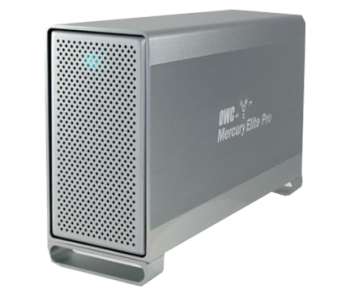 |
| Great Expanse: The OWC Mercury Elite-AL Pro RAID 2TB Storage offers enormous capacity and good speed for working with huge files. But its RAID 0 configuration means it’s not designed for data backup. |
Although the Pro’s vendor, Other World Computing, sells a number of Apple-oriented products, the Elite-AL Pro will work with any computing platform that supports Firewire or USB.
The aluminum shell houses two 1TB hard drives configured in a RAID 0 architecture. In this design, RAID reads and writes data in “stripes” which span both physical drives, but your computer sees it as one really big drive. By splitting data across drives, RAID 0 maximizes read and write performance. We’ll discuss what you sacrifice for that performance in a bit.
Both SATA hard drives run at 7,200RPM and feature 32MB buffers. It is worth noting that SATA can deliver data at rates in excess of even Firewire 800, and therefore any external connection creates a bottleneck compared to internally-mounted hard drives. Neither the Elite-AL Pro nor any external solution can deliver the hard drives’ maximum speeds. That said, external storage delivers sufficient performance for all but the most demanding tasks.
Of course, the flagship feature of the highest-capacity Elite-AL Pro is sheer storage – two terabytes. The thought alone packs a punch. Many organizations use this kind of prodigious storage for very large media files, considering that you can store hundreds of high-definition recordings in this much space. But any organization that generates lots of data will appreciate the ease-of-mind offered by such tremendous storage capacity.
In truth, the Elite-AL Pro doesn’t quite deliver two terabytes because hard drive capacities are reported without consideration for system overhead. Once formatted, expect about 1.8TB of free space, although this can vary depending on which file system you use.
Other World Computing includes all necessary cables in the box, including power, Firewire 800 and 400, and USB 2.0. The package also includes a CD-ROM with two commercial data backup applications – Prosoft Engineering Data Backup for Mac OS X and NovaStor NovaBACKUP for Windows. Mac users also get Intec SpeedTools, which includes drive defrag, analysis and benchmarking utilities.
Three Speeds
The three kinds of external connections supported by the Elite-AL Pro each deliver different speeds. Firewire 800 delivers the fastest performance, at about 90MB/sec in real world usage. For the sake of comparison, this same SATA RAID 0 configuration mounted internally would deliver rates about 20 percent faster.
USB 2.0 delivers the second fastest performance, at about 50MB/sec in practice, which is obviously a significant decrease compared to Firewire 800. Finally, Firewire 400, which is still the most common Firewire type, delivers approximately 40MB/sec. Although slightly slower than USB 2.0, it consumes slightly less CPU load, as well. Ultimately, unless you take advantage of the Elite-AL Pro’s Firewire 800 connection, the performance advantage of its RAID 0 configuration is basically lost. But its huge capacity remains.
Know the Risk with RAID 0
Other World Computing backs the Mercury Elite-AL Pro with a two-year warranty. However, it’s important to understand the risks of a RAID 0 storage solution, particularly for businesses that are looking for a data backup destination.
RAID 0 is not a safe configuration for data backup. Because RAID 0 divides data in half across two physical drives, your risk of data loss increases compared to a single physical hard drive. In RAID 0, if either drive fails, you risk losing all of your data. Since there are two drives, there are twice as many “opportunities” for failure compared to a single drive solution. For this reason, RAID 0 is typically recommended only when maximum performance is more important than data protection.
Bottom Line
If you need a drive that offers speed and an enormous amount of capacity, and you have other data backup protection, the OWC Mercury Elite-AL Pro RAID 2TB Storage is a great choice.
Aaron Weiss a technology writer, screenwriter and Web development consultant who spends his free time stacking wood for the winter in Upstate New York. His Web site is: bordella.com
| Do you have a comment or question about this article or other small business topics in general? Speak out in the SmallBusinessComputing.com Forums. Join the discussion today! |