







The so-called “paperless society” is still a pipe dream judging by the stacks of documents that go into our recycling bin every week. That spells good news for printer makers, since printing is their bread and butter, and for consumers, because high-quality, multifunction color inkjet and laser printers continue to come down in price while adding features.
The Epson WorkForce 845 ($199 MSRP, $150 street) is a compact AIO (all-in-one) inkjet with two-sided printing, scanning, and faxing. It promises fast output speeds and advanced networking features all at a modest price pitched at the home office/small office (SOHO) market.
Setting Up Epson’s Color Inkjet Multifunction Printer
At about 17 inches wide, a foot high, and about 22 pounds, the WorkForce 845 is compact but sturdy. It is basically a rectangular black box with a contemporary sleek look. A large touch-screen panel dominates the control panel, although only a portion of the touch screen actually displays content, while touch-sensitive buttons occupy the remaining real estate.
The Epson 845 color inkjet multifunction printer includes dual paper trays with a 250 sheet capacity each, meaning you can divide a typical 500 sheet ream between both. Note though there is no manual feed for a one-off print job.
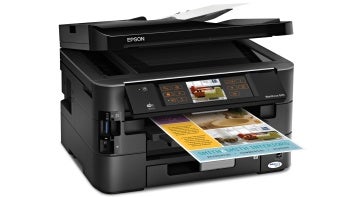
The Epson WorkForce 845 is a very affordable multifunction printer with fast output and strong photo printing.
The front panel also includes slots for the full range of memory cards including CompactFlash, MemoryStick, SD, SDHC, and many more. A single USB slot accepts thumb drives or (externally powered) hard drives. Some smart phones can connect to the USB slot to share photos if the phone supports mounting itself as a USB mass storage device.
You can connect the WorkForce 845 directly to a PC or Mac by a rear USB port, or use the Ethernet jack to plug the printer into a router accessible from any machine in your LAN. Better yet, built-in wireless support accomplishes the same thing with no cabling at all (well, besides the power cable).
When you first boot up the WorkForce 845, the screen walks you through initial setup, including connecting to a wireless network if available, and installing the four ink cartridges (CMYK). Considering the printer comes with a color display, the setup wizard could be better illustrated, and it could provide more detailed directions.
Typing characters, such as a wireless password, is a bit cumbersome as you need to scroll through each letter — it does not pop up a virtual keyboard as on an iPhone or iPad. But once you’re done, you’re done.
Color Inkjet Multifunction Printer Software Support
Before you even install anything on your computer, the Workforce 845 is quite functional. You can copy, of course, but you can also print from or scan to a supported memory device. You can even browse and select photos from a camera memory card and print them directly without any computer at all.
Still, most people will want to install the driver software. Epson includes print and scan drivers for both PC and Mac. Mac owners should note that network functionality is somewhat reduced compared to the PC software. For example some features, such as initiating a scan from the printer control panel, only work with Mac when connected by USB, not network.