







 If you’re not upgrading an existing system, PDUW7 lets you transfer via an external hard disk, network connection, or specialized USB cable. (Click for larger image). |
As Windows 7 approaches its first anniversary, it’s built a reputation as a solid operating system and (finally) a worthy successor to XP. So why do so many small businesses continue to muddle through with the now nearly decade-old XP?
If the cost of buying Windows 7 or new computers with the OS installed isn’t the primary obstacle — we don’t have to tell you that money can be tight these days — the major deterrent is probably the hassle that’s sure to be involved with making the switch.
After all, you technically can’t “upgrade” from XP to Windows 7. Rather, you have to do a fresh install, which also means re-installing of all your applications — a laborious and time-consuming process if there ever was one. Plus, do you even know where you put all your software discs and license keys? Then there’s the issue of whether your existing programs will even work properly with Windows 7.
It’s also highly advisable to perform a system backup prior to any OS upgrade; PDUW7 doesn’t do one for you, but does remind you up front to perform or verify that you possess a current backup (and if you decline, politely urges you to reconsider). The software also provides a link to a 90-day trial version of Acronis Online Backup, though the 2 GB storage cap isn’t nearly enough for a comprehensive backup of a typical system.
Before beginning the transfer, PDUW7 gives you the option to migrate all of your installed programs or just pick specific ones from your Add/Remove Programs list. The latter option is handy if you only need a handful of key applications and would like to limit the amount of detritus that moves over from XP to Windows 7.
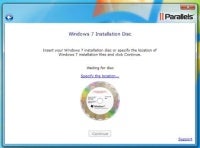
PDUW7 also prompts you to insert the Windows 7 disc and Windows 7 license key long before you actually need either of them, which then allows you to leave the system so you don’t have to babysit it during the rather lengthy upgrade process.
On our test system didn’t require user input again until about two hours later, when it needed a Windows login in order to put the finishing touches on the virtual machine configuration and complete the upgrade.