







No business cliche gets more mileage than “time is money.” For good reason. Sometimes by spending a little more of the latter, you can free up some of the former. It’s with that type of thinking that you may want to consider the WorkCentre M20/M20i, speedy multifunction devices that Xerox announced today.
You could pay less (a lot less) for a multifunction device than what you’ll see when you look at the $1,649 or $2,199 price tags attached to the M20/M20i, respectively, but then you wouldn’t get 22 page-per-minute printing, color scanning, copying, faxing, e-mail and other features that separate the WorkCentre from lower-end products.
The M20 is aimed primarily at small groups of 1-5 people and doesn’t come with built-in support for Ethernet, which is standard on the $2,199 M20i. The $1,649 M20 has both USB and parallel interfaces and you can purchase network accessory kit, Joy Lipari, Xerox manager of product marketing, said. Both models also offer 600×600 dpi resolution (Xerox reports it provides 1200×1200 dpi resolution through interpolation
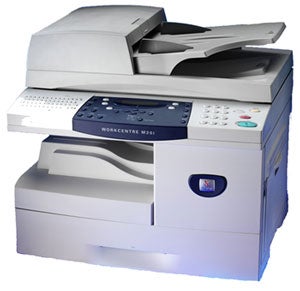
Both printers provide automatic two-sided printing (i.e., duplexing) in both copy and print modes, and accept letter and legal-size (8.5 by 14 inches) paper through its 550-sheet paper tray. You can add a 250-sheet paper tray for an additional $295, which is a good idea if you want to mix paper sizes during a print job or if you just switch between paper types on a regular basis.
Lipari said the a feature called ID Card Copy lets people copy both sides of a document, such as a license or insurance card, onto one side of a piece of paper. This is a time-saver and paper-saver for businesses in the medical and healthcare field, she said.
The WorkCentre M20 digital copier/printer offers color scanning, but the M20i goes a step further and offers color fax and color scan to e-mail capabilities. The M20i also offers compression technology to create smaller files that can be faxed or e-mailed more quickly.
Both the M20 and the M20i, Lipari said, come with ScanSoft’s PaperPort SE v9.0, which is designed to let you create PDF files from scanned documents, and OmniPage SE v2.0 software, which converts paper and PDF files into editable text-based documents. Both models (as well as the copier-only version called the CopyCentre C20) are available immediately.
Dan Muse is executive editor of internet.com’s Small Business Channel and EarthWeb’s Networking & Communications Channel.
| Do you have a comment or question about this article or other small business topics in general? Speak out in the SmallBusinessComputing.com Forums. Join the discussion today! |