







We won’t go so far as to compare NEC-Mitsubishi’s engineers to Piet Mondrian or Maya Lin, but the NEC MultiSync LCD1960NX sort of reminds us of the kind of art that makes some people say, “Is that it? It’s so simple, there’s nothing to it.”
The newest MultiSync model is a rather plain-looking, 19-inch LCD monitor — a thin-bezel design, but not as thin or nearly borderless as some — with a simple beige stand. It doesn’t have built-in audio speakers, nor does it pivot between portrait and landscape modes. And at $750, it’s about a hundred bucks over the bargain line for 19-inch flat panels.
But the 1,280 by 1,024-pixel NEC has both analog VGA and digital DVI-D connectors, instead of the single, analog interface found on many low-priced LCD monitors. It has an internal power supply, not a notebook-PC-style power brick or external adapter, and comes with a sheath for the back of its stand so you can stash the power and video cables neatly.
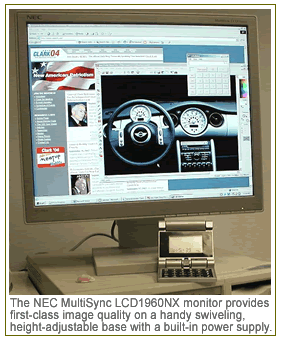
And that simple beige stand has a lot to offer: It conceals a lazy-susan base so you can swivel the monitor with the push of a fingertip, as well as adjusting its tilt (anywhere from 30 degrees backward to 5 degrees forward).
Better yet, it gives you 4.3 inches of height adjustment, letting you adjust the screen to your eye level instead of the other way around. (Try that with a 21-inch CRT!) Our only minor gripe is that, while the display is easy to raise — in fact, it glides upward with the slightest push — you must grasp both sides and yank down firmly to lower it.
As you’d expect from a flat panel, the MultiSync LCD1960NX is slim (7.5 inches deep), light (17.2 pounds), and easy on your electric bill (38 watts, dropping to 2 watts in standby mode). Like many LCDs, it has two on/off switches — a “vacation switch” on the left side serves as a backstop to the everyday power button at the bottom right.
Fine Viewing, Fussy Buttons
We didn’t spy any bad pixels among our test unit’s 1,280 by 1,024, and found its 25ms response time smooth enough for all but the fastest mousing and scrolling, although hardcore gamers will typically hold out for a 20ms or faster panel. Screen images were flicker-free at the usual LCD refresh rate of 60Hz, although the NEC can manage 75Hz with an analog input, and we’d rate the MultiSync’s viewing angles at close to their advertised 170 degrees — if coworkers gather around the screen to watch a presentation, those on either side won’t suffer.
 With a pixel pitch of 0.294mm, the NEC looked sharp even with tiny text or finely detailed images, and its 600:1 contrast ratio is a step above lower-priced LCDs’ — while its “no-touch” automatic adjustment of size, centering, and other parameters (activated the first time the monitor’s turned on with an analog graphics card) set brightness to a default of 100 percent, it left the contrast setting at 50 percent. We could distinguish all the color gradients in our DisplayMate test screens at a glance, except maybe for the very darkest pair of hues at one edge.
As far as image quality is concerned, if we had to stretch for something to criticize, we’d say the LCD1960NX’s 250 nits of brightness leave it just a bit short of whiter-than-white backgrounds or peering into the most shadowed areas of some images. But everyday office users shouldn’t have the slightest complaint, while even graphics-editing pros will be pleased by the display’s choice of six color temperature presets including sRGB.
As artists know, it’s often hard to make something simple. The one area where the MultiSync stumbles is its on-screen control menu, which combines cryptic icons with small, unintuitive buttons along the bottom edge of the bezel — Select and Exit buttons move among menu tabs, with left and right buttons to choose functions and plus and minus buttons to adjust values such as brightness and contrast percentages. It’s one of the more awkward examples we’ve seen of an invariably awkward genre.
Fortunately, the auto-adjust function works well enough that you’ll rarely if ever need the menus. And if you do — and have an up-to-date graphics card and driver installed — you can download a NaViSet software utility from the NEC-Mitsubishi site that uses the Display Data Channel Command Interface protocol to provide a mouse-controlled Windows alternative to the pushbutton menu.
Control buttons aside, the MultiSync LCD1960NX is a, well, simple and attractive option for anyone who’s seeking an upscale LCD monitor and doesn’t need game-freak response speed or portrait-mode pivoting: Its excellent image quality and ultra-adjustable base let you focus on your work instead of thinking about your display.
Adapted from HardwareCentral.com.