







When it comes to small business security, protecting computers from malware attacks isn’t as simple as installing anti-virus (AV) software and calling it a day. Having AV software is a good first step, but it’s also crucial that you keep all of your installed software up-to-date. Otherwise, it could harbor known security vulnerabilities that hackers can exploit.
The sheer ubiquity of certain utilities makes them juicy targets for the bad guys. Oracle’s Java, Adobe Flash, and Adobe Reader all fall into this category, and it’s especially important to keep them up-to-date. The need was recently underscored by the theft of Adobe Acrobat source code (not to mention info on almost 3 million customers).
Updating this kind of stuff on even a handful of PCs is cumbersome, and doing it on dozens, scores, or hundreds of PCs is a colossal chore, which is why many small businesses don’t update as often as they should (or at all). In fact, we recently suggested the possibility of uninstalling Java for businesses without the time or resources to keep up with the security updates (which for a while were seemingly issued on a weekly basis).
While there are plenty of ways to automate software updates on a corporate network—Active Directory Group Policy and various network patch management tools come to mind—most are too complicated, pricey, or both, for many small businesses to seriously consider.
An Easier Way to Update Java
Say hello to Ninite Pro, a utility/service that makes updating Java, Flash, and Reader—as well as 100+ other apps—on a large number of machines simple and quick. And although it’s not free, the cost is reasonable considering it lets you remotely complete all of your updates in minutes rather than the hours or days it could take to perform them manually.
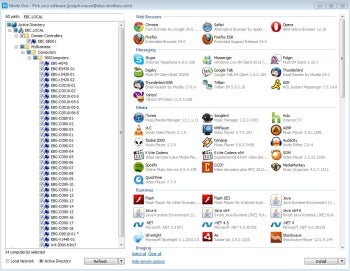
Figure 1: Ninite Pro can remotely update PCs from a list of more than 100 different apps.
Ninite Pro is a subscription service that’s priced depending on how many PCs you need to update. It costs $20 per month for up to 100 PCs, $50 for 101-250 computers, and higher tiers are available once you hot or exceed the 500 mark. You can pay annually rather than monthly, but there’s no price break. The only benefit: you get one bill a year instead of twelve. There’s also a 1-week trial available so you can put Ninite Pro through its paces before you shell out any cash.
How to Use Ninite Pro
It’s important to note that you don’t need to install Ninite Pro on all your PCs. In fact you don’t need to install it on any PCs; simply download it onto one computer on your network, create a folder for it in a suitable location, and then run it directly from there.
For Ninite to work properly, you need to give it the appropriate local or domain administrator username and password for the PCs you plan to update. If you are on a Windows domain, you also need to run the Ninite Pro program under the domain admin account. If you aren’t logged in using that account (and for security reasons, you certainly shouldn’t be), right-click the icon and launch the software using the Run as Administrator option.
When Ninite Pro starts up, you’ll see a rather extensive list of supported programs across a number of different categories. But before you pay too much attention to them, click on the Show remote options link in the lower-left corner of the window. The window will expand and list the PCs (servers too) it’s found. You can choose to have Ninite Pro pull a list of PCs from Active Directory or scan the local network and see what it finds.
Once you’ve chosen the specific PCs you want to work with (note that all systems identified are also selected by default) you can click and highlight one or more programs from the right column. For example, you’ll find various versions of Java and Flash in the Runtimes category, while Reader is further down under Documents.