







After two generally well-received public beta releases of Windows 8 this past spring, Microsoft has confirmed that the next version of Windows should be locked down by early August, with general availability expected by late October.
Of course, with each new version of Windows, an inevitable question arises—should you plan to upgrade your small business IT, or should you stay on the sidelines for a while? While there’s no simple answer to that question, here are several good reasons to embrace Windows 8 upon its release, along with one more reason (and it’s a big one) to consider standing pat for a while.
The Clock is Ticking on Windows XP
If your business is one of the many still creaking along with Windows XP, your day of reckoning is close at hand. Microsoft’s support for Windows XP will end in less than two years—on April 8, 2014, to be exact—which means no more security fixes, new drivers or other updates after that date.
But forget about 2014—by the time Windows 8 launches this fall, Windows XP will already be more than 11 years old, which probably makes it the oldest piece of technology your business is running. Windows 8 represents a good opportunity to (finally) bring your PCs into the 21st century.
Anti-Virus Built-in to Windows 8
Although the built-in Windows Defender software that comes with both Windows 7 and Vista provides spyware protection, it doesn’t guard against viruses, which is why supplementing it with separate anti-virus software is a must.
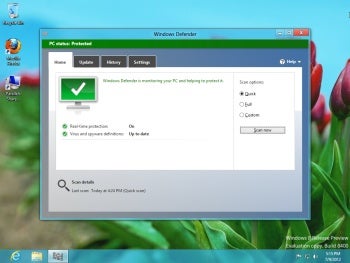
Figure 1: Windows 8 comes with Windows Defender, which unlike previous versions of Windows, includes anti-virus protection.
By contrast, the Windows Defender that ships with Windows 8 offers the same full-fledged virus and malware protection you get with Microsoft’s well-regarded Microsoft Security Essentials (MSE), without the need to download or install additional anti-virus software. (Plus, it’s truly free, because although MSE is free to download for personal use, the license agreement limits its use by small businesses to a maximum of 10 PCs.)
You Can Upgrade Cheap—If You Act Fast
Microsoft hasn’t announced official Windows 8 pricing yet, but upgrading to the latest version of Windows typically costs anywhere from $100 to $200. Thanks to an upcoming Microsoft promotion, though, you can get Windows 8 for a fraction that if you act quickly.
That’s because from the date of the Windows 8 launch until January 31st, 2013, any PC running Windows 7, Windows Vista, or Windows XP will be eligible to download a Windows 8 Pro upgrade for a mere $40. (The packaged retail DVD version of the upgrade will be available at a still highly-discounted price of $70.)
What’s notable about this upgrade promotion—aside from the low price—is that you don’t have to be currently running a Professional/Business version of Windows 7, Vista, or XP to qualify. Even if you have one of the consumer (i.e. Home) versions of Windows, you can still upgrade to the more feature-laden and business-centric Windows 8 Pro for forty bucks.
Better Mobility with Windows to Go
Businesses that opt for Windows 8 Enterprise (only available through Microsoft’s Software Assurance volume licensing program) can avail themselves of Windows to Go, a feature that enables a self-contained, secure and customizable Windows 8 environment to run on a portable USB flash drive.
Windows to Go can be extremely useful in a number of different scenarios, from allowing contract and remote workers to access corporate applications and data from personal PCs (rather than having to issue them company-owned hardware), to giving in-office workers greater mobility by not tying them down to a particular PC.