







What do small businesses want when it comes to printing? If you ask Xerox, the answer is color. According to the company, its customers want high-quality color printing but balk at paying the price. So the company developed and recently announced two new additions to its solid-ink printer and multi-function printer line: the Xerox Phaser 8860 and the Xerox Phaser 8860MFP.
These are the first Xerox printers to use the next-generation of the company’s crayon-like solid ink sticks. According to David Bates, vice president of product marketing at Xerox, the new sticks, which took nearly five years to develop, have been formulated to last longer than the original solid ink. “The new ink sticks let you print more color pages and that reduces the overall cost of color printing,” he said. “The Phaser 8860 devices prints color at the same price as it prints monochrome pages.”
Xerox designed these two devices for small companies that print between 1,000 and 10,000 pages per month, and said the series is ideal for real estate agencies, marketing firms, design agencies and other companies that want color for proposals, marketing collateral, reports and other business documents. Both devices offer up to 30 pages-per-minute print speed, a 750 MHz processor and Adobe PostScript3. They also come standard with two paper trays; one that holds 100 sheets and a second that holds 525 sheets. You can buy a third or even a fourth paper tray at an additional price.
In addition to printing, the 8860MFP handles copy, scan and fax capabilities. It also offers automatic two-sided printing, N-up printing (print multiple pages onto one page) and optical character recognition (OCR) software.
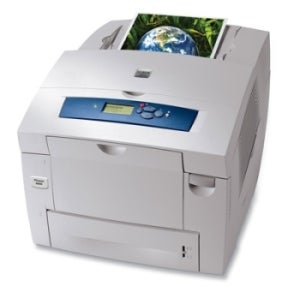 |
| Color for Less: Xerox claims its new Phaser 8860 (pictured) and the Phaser 8860MFP print color pages that cost the same as black and white. |
The new color Phaser 8860 costs $2,499 – that’s about $1,000 more than the current black-and-white-only model, the Phaser 8560. So what happened to the savings?
“While the new 8860 costs more, it prints color at the same cost as monochrome,” said Bates. “If your company wants color and prints more than 1,000 pages per month, then it makes financial sense to buy the new model. If you print less than 1,000 pages, it makes more sense to buy the older 8560.”
The solid ink sticks, which load directly into color-coordinated ink trays, don’t require any type of cartridge. Xerox claims that fact alone reduces packaging waste by 90 percent (compared to competing laser printers) and highlights the Phaser 8860 as an environmentally friendly product.
As for the price of ink, Xerox hired SpencerLab Digital Color Laboratory to test the 8860. According to David Spencer, the lab’s president, the tests results showed that the new solid color ink costs about one third the price of the black. “What this means (and our tests confirmed) is that now…you can print almost any document in full color on this desktop printer for the same cost as printing it in black and white,” he said in a written statement.
The base price for the Phaser 8860 printer is $2,499 while the starting price for the 8860MFP starts at $3,999. A six-pack of black ink, with a yield of 14,000 pages, sells for $216 and the color sticks – cyan, red and yellow – cost $72 each. Xerox said that each color stick also yields 14,000 pages.
Lauren Simonds is the managing editor of SmallBusinessComputing.com
| Do you have a comment or question about this article or other small business topics in general? Speak out in the SmallBusinessComputing.com Forums. Join the discussion today! |