







For decades, the printer industry has followed the highly lucrative razor-and-blade business model; give away the razor and make your money on the blades. The industry has made a fortune by selling low-cost printers and very expensive ink. How expensive? According to Consumer Reports, prices range between $13 and $75 per ounce.
Epson plans to change all that. Its new line of EcoTack printers and MFPs take a drastically different path—they don’t use cartridges. Instead, a bump-out on the right side of the device contains four larger ink reservoirs designed to last long past the typical life expectancy of a set of inkjet cartridges. Curious about this new approach to small business printing, we put the Epson WorkForce ET-4550 EcoTank—a multifunction printer (MFP) to the test.
What’s Different About the EcoTank ET-4550 MFP?
Epson claims that the ET-4550’s reservoirs hold enough ink to print 11,000 black pages, or 8,500 color pages, and that you can easily refill them from small bottles of ink. These bottles are priced cheaply enough that it makes sense to get spares long before you need them, though Epson includes one set of spares along with the MFP.
The logic behind this selling-strategy switcheroo is simple. Instead of pricing the MFP low enough so that both the vendor and the dealer barely make a profit and using low capacity, high-priced ink cartridges to generate the revenue stream, Epson charges a price premium right up front ($499). But that price also includes an extra set of ink bottles, which means that you can print more than two cases (10 reams of 500 sheets) of monochrome pages.
And when you do run out of ink, replacement bottles won’t cost you an arm and a leg. The black ink bottle costs $19.49 and yields about 11,000 pages, while each color bottle costs $12.99 and provides about 8,500 pages of print. That’s a very low cost per page, at least based solely on ink.
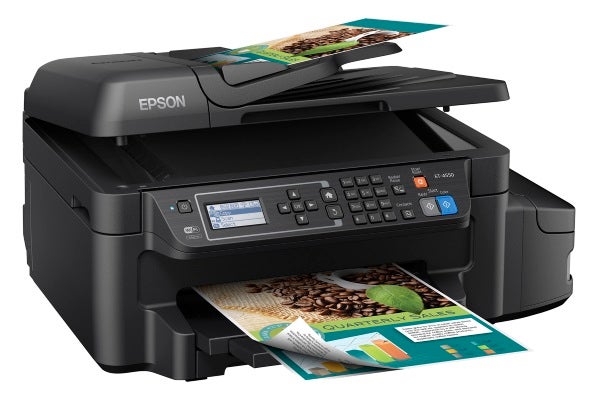
The Epson WorkForce ET-4550 EcoTank features high-capacity ink reservoirs.
Epson claims that the four bottles provide the equivalent page yield of about 50 replaceable cartridges. Epson estimates that the ink supply in the box is enough ink for the average small business to print for two years. Unfortunately, we had neither the paper supply nor the two years to actually test this.
WorkForce ET-4550 EcoTank MFP Features
Epson designed the ET-4550 for small business or for use as a departmental MFP. Business MFPs generally add a fax capability to the print/scan/copy mix, and the ET-4550 is no exception. While faxing is much less popular these days, many organizations still prefer a faxed copy of a document rather than an electronic copy, so having the capability to fax may prove more useful even if you transfer most of your documents electronically.
The printer includes both a power cord and a phone cord to hook the ET-4550 up to a standard telephone RJ-11 connector. If you want to attach the MFP directly to a PC or a Mac, you’ll need to provide a USB cable, since there isn’t one in the box. Nor does it include an Ethernet patch cord. The ET-4550 does connect to a network via Wi-Fi, and it can also connect to a PC, laptop, tablet or smartphone via Wi-Fi Direct, bypassing a network connection altogether.
The ET-4550 sounds advanced, but unfortunately, it is a bit less so than you might think. Other than its unusual ink system, it’s similar to the Workforce WF-2650, one of Epson’s lower-end Workforce models. The unit is small and light, measuring 20.3 x 14.2 x 9.5-inches without the front-mounted output tray extended, and that width includes the 4-inch bump-out that holds the ink reservoirs.
The ET-4550 also weighs in at a scant 16.3 pounds. Other than the additional size on the right side of the device to accommodate the ink tanks, the ET-4550 is pretty much the same machine as the WF-2650. It uses the same single PrecisionCore printhead, has the same 2.2-inch non-touch sensitive monochrome LCD display, the same duplex printing capability, and the same 30-sheet non-duplexing ADF (automatic document feeder). One large difference between the older WF-2650 and the new ET-4550 (other than the vastly different ink supply system) is that the new EcoTank MFP adds an Ethernet port, which the older Workforce machine lacked.
And unfortunately, as with the WF-2650, it shares the same 150-sheet capacity paper tray. That seems kind of like an oversight in a device that’s configured and supplied to print 11,000 pages right out of the box. You might not change ink for the two years that Epson estimates, but you sure will fill the paper tray frequently.