







With their dual-core processors and plentiful memory, today’s desktop PCs are more than adequate to run your typical business software. But when your software is anything but typical, you need to think bigger, like the HP xw4550 Workstation. You can equip this machine to tackle the most demanding applications, and it offers an upgrade path that will keep it in service for the long haul, yet it starts at an affordable $599.
In spite of the budget price, the AMD-powered xw4550 offers unique features that set it off from a mere souped-up standard PC. First and foremost, the platform’s configurations are certified to work with the leading technical applications. That means architects, engineers, videographers, image editors and other professionals can spend their time doing their work, not troubleshooting hardware/software conflicts.
The xw4550 also supports AMD’s latest quad-core Opteron processors and professional (as opposed to consumer) graphics cards from nVidia and ATI, so it offers plenty of computing horsepower to run demanding applications such as Adobe InDesign, Photoshop and Premier, AutoCAD and Parametric’s Pro/E.
Easy for IT
Unlike most business desktop PCs, workstations tend to get tweaked and upgraded throughout their useful lives (which can easily be five to seven years), and the xw4550 makes such tinkering easier. Simply pop the latch and the large side panel slides off (there’s a spot for a lock if you’re concerned about components disappearing), revealing the case’s spacious interior. There’s plenty of room to work should you need to augment the base system’s 2GB of RAM (it supports up to 4GB), add a new PCI card (the xw4550 supports up to four full-length cards), slide in a second hard drive or add another optical drive.
There are, however, some tradeoffs in opting for this platform versus one of HP’s higher-end workstation offerings. For example, other models support up to seven PCI cards and up to a whopping 128MB of RAM, and the xw4550’s 300-watt power supply can support only so many internal components (other machines in HP’s workstation line offer up to a 1050-watt power supply). But for designers, publishers, video editors and power users, the xw4550’s expansion potential should be adequate.
Hands-on Use
As you unpack the xw4550, it instantly becomes clear that its no ordinary PC—and not just because of the optional “flame” decal graphics included on our test unit (You can order the removable, customizable vinyl “skins” can be directly from HP). The real tip-off is the weight of the system: at nearly 33 pounds, it’s much more substantial than the predominantly plastic PC towers in this price range.
The front of the tower is dominated by a large air intake. While this is good for cooling, we would prefer to see some sort of dust filter with this grille, too, since dust buildup can cause overheating and premature component failure (especially considering this large tower is very likely to be placed on the floor beneath a desk).
Up front you’ll also find spots for three 5.25-inch devices, two of which are full-length to accommodate optical drives, as well as a spot for a floppy drive or card reader. There are two USB ports (FireWire is an option) and headphone and microphone jacks, too. HP even built in a small monaural speaker; it’s no replacement for a set of external speakers if you want to play music, but it’s fine for handling Windows’ sounds and alerts.
Around back, the xw4550 delivers an additional six USB ports, a Gigabit Ethernet port, audio jacks and VGA and DVI ports for connecting a monitor. Depending on the graphics card you choose, you may also get twin DVI ports for a multi-monitor setup. The base package also includes HP’s standard keyboard and optical mouse; a monitor costs extra.
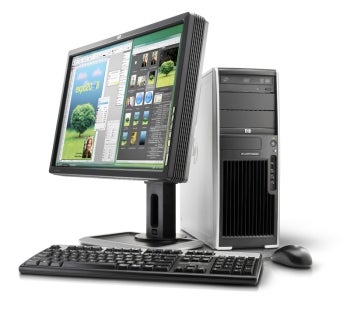 |
| The HP xw4550 has the power of a workstation but the starting price of a budget PC. |
As for the operating system, you can choose from 32-bit or 64-bit flavors of Windows Vista or good old Windows XP, as well as 32-bit Red Hat Enterprise Linux. HP also preloads its “Cool Tools” utility suite, which includes HP Backup and Recovery Manager, HP Performance Tuning Framework and HP Insight Diagnostics for troubleshooting hardware problems. And unlike most PCs in this price range, the xw4550 includes a one-year warranty with on-site service and free 24/7 telephone tech support.
The xw4550 is surprisingly quiet in typical use, with a barely discernible whir from its fans. With the ambient noise of a typical office, you likely won’t hear it at all. HP also claims that the xw4550 is more environmentally friendly than other machines, thanks to a power supply that is 80 percent efficient (versus 60 to 70 percent for a typical PC) and the machine’s Energy Star compliance.
All HP workstations have also earned Gold Certification from the Green Electronics Council’s EPEAT (Electronic Products Environmental Assessment Tool) program, which requires low energy consumption, use of environmentally sensitive materials and a recycle-friendly design.
If your computing needs go beyond simple office productivity applications, the HP xw4550 Workstation is worth a look. The broad range of component options ensure you’ll be able to configure the right system, and the xw4550 is the ideal platform if your business needs a workstation-class machine but you thought you couldn’t afford one.
Jamie Bsales is an award-winning technology writer and editor with nearly 14 years of experience covering the latest hardware, software and Internet products and services.
| Do you have a comment or question about this article or other small business topics in general? Speak out in the SmallBusinessComputing.com Forums. Join the discussion today! |