







When you hear the phrase “data security,” you probably think of anti-virus software, password protection or maybe even encrypted files. It’s not too likely that you think of USB ports, memory keys and CD writers. Typically unmonitored, these overlooked ports and devices make it all too easy for critical or sensitive data to waltz right out the company door.
SmartLine, a software company based in Moscowwith its U.S. office in Ramone, Calif, offers DeviceLock, a program it says can prevent data theft (whether intentional or inadvertent) by blocking or regulating access to a range of PC ports, recording and storage devices.
“Approximately 80 percent of security breaches come from within an organization,” said Vladimir Chernavsky, SmartLine’s CEO “The proliferation of USB memory devices increases the danger of keeping those ports open. Without protecting those ports, not only can you lose a great amount of data very quickly, but you run the risk of employees introducing viruses into your network.”
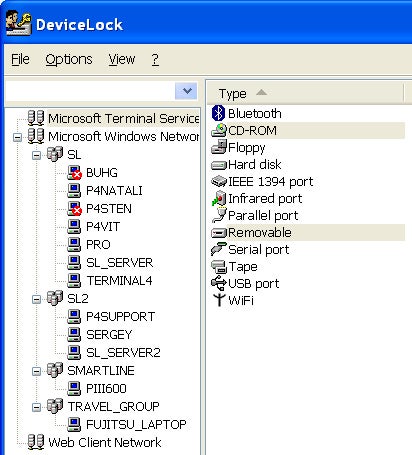
According to Chernavsky, DeviceLock protects a range of ports and devices including the following:
- USB and FireWire ports
- Bluetooth and Wi-Fi adapters
- PDAs, floppy, CD/DVD drives and tape devices
- Flash memory keys, Zip drives
- Serial, parallel and infrared ports
How It Works
The software — the latest version is due out in December and adds PDAs to its list of devices — is designed to let you control device and port access in a number of ways. Using the central management console, you can set rules for all the computers on the network.
You can also use the software to determine access rights and permissions for groups or individuals on a device-by-device or port-by-port basis. For example, Chernavsky notes that you can allow employee A to use his USB port for a printer, but not for memory devices, while employee B can’t access his USB ports for anything.
“Many employees use USB flash memory keys to copy files and work on them at home,” said Chernavsky. “So what happens when an employee loses a memory key that’s filled with sensitive company data? The devices are cheap, but the stored data isn’t.”
He points out that with government regulations in the financial and healthcare industries, liability issues are a big concern. “For big businesses, the worse case scenario is the company loses money,” said Chernavsky. “Small businesses would have a much tougher time surviving potential litigation. Their worst-case scenario means going out of business.”
|
|
DeviceLock’s software interface lets you assign group and individual access rights for a variety of ports and devices. |
Compatibility Specs and Pricing
DeviceLock works with Windows XP, Windows NT 4.0 and 2000 and Windows Server 2003. Chernavasky said they also have versions for Windows 95 and 98, You can buy the software through the Website (via download or CD) for $35 per user, and the company offers a 30-day free trial.
Lauren Simonds is the managing editor of SmallBusinessComputing.com
| Do you have a comment or question about this article or other small business topics in general? Speak out in the SmallBusinessComputing.com Forums. Join the discussion today! |