







Virtual Private Networks (VPNs) are used by many organizations to connect remote networks together and to securely access the network when away from the offices. Thanks to Google’s network services and a third-party company, Gbridge, you can have your own VPN.
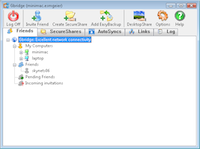
Figure 1.
You can install the Gbridge software (see Figure 1) on all your computers to remotely access your desktop, files, and to sync or backup folders. All this travels through your virtual encrypted network, so everything is totally secure–great for when connecting to your computers from Wi-Fi hotspots. You can even invite friends to your Gbridge network, giving them limited access to your files and computer.
Here’s a rundown of the features and functionality offered by Gbridge:
- Access files shared by Gbridge on your or your friends’ computers, from within a Web browser.
- When remotely viewing photos, it creates automatic thumbnails and sideshows.
- It also gives you instant access to video and media files.
- Access the regular Windows shared folders/drives between your computers.
- Use remote desktop over an encrypted connection to your or your friends’ computers.
- Use AutoSync to synchronize folders between your computers and/or friends.
- Use EasyBackup to automatically have a directory(s) backed up to another computer.
Understanding the Accounts and Hostnames
To use the Gbridge service, you login using a Gmail account. If you don’t have one, create an account like normal on Google’s Gmail site.
When you login later, you’ll also notice that you must input a Hostname. This is a name that identifies the particular computer and is displayed in Gbridge on each of your computers and your friends’ computers. For example, for your computer at home you might put HomeDesktop, for the PC at work you might use WorkDesktop, and for the laptop you might just say Laptop.
Read the Full Story
| Do you have a comment or question about this article or other small business topics in general? Speak out in the SmallBusinessComputing.com Forums. Join the discussion today! |